eCommerce
Buy nowSell access to the platform, spaces, groups, events, hidden messages, or physical products.
How the module is organised
| Folder | What lives there |
|---|---|
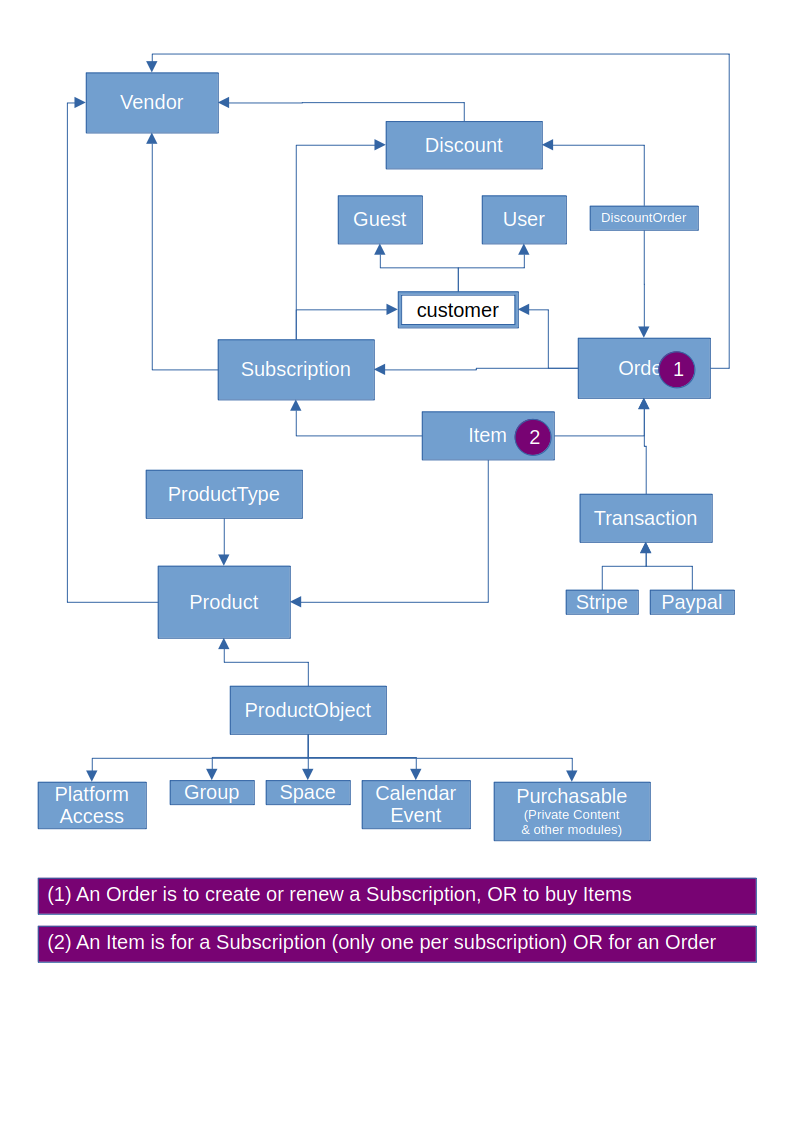
models/ | Vendor (who sells: currency, payment methods, API keys), Product, Order and its Items, Transaction (one payment attempt or refund, with its Stripe or Paypal row), Subscription, Discount and DiscountOrder, Guest, Log |
models/forms/ | The forms behind the admin pages and the checkout (OrderForm is the checkout) |
controllers/ | Store, cart, checkout, the customer pages (UserController, GuestController), the admin pages and WebhookController (Stripe and PayPal) |
services/ | Stripe logic: webhooks (StripeWebhookService), subscriptions, tax calculation and tax numbers |
components/ | StripeApi and PaypalApi: every call to the payment providers goes through them |
helpers/ | CartHelper (the session cart), CheckoutHelper, Cleanup (daily cleanup), conversions, notifications |
jobs/ | UpdateSubscriptions (daily), UpdateDiscountStatus (hourly), Stripe and followers jobs |
tests/codeception/ | The unit and scenario tests (see "Tests" below) |
Life of an order
CartHelper::add()puts a product in the cart: anOrderinbeing_createdwith oneItemper product.- The checkout (
CheckoutController::actionIndex, three steps) fills in the customer, applies discount codes and taxes, then creates aTransactioninopenfor the chosen payment method. - The payment is confirmed by the provider: the Stripe webhook, or the PayPal return page that captures the payment.
The transaction becomes
succeededandOrder::updateValuesFromTransactions()completes the order. The order then gives access to the purchased objects and, for a subscription product, extends theSubscription. - A refund creates a second transaction (
refunded_*) attached to the same order.
An order can be paid only while its status allows it (Order::isPaymentAllowed()): a completed or refunded order
never opens a new payment. Before a new Stripe checkout is opened, CheckoutHelper::expireEarlierStripeCheckouts()
closes the previous Stripe pages of the same order, and refuses (HTTP 409) when a payment is already under way, such
as a SEPA bank debit, so that a customer is never charged twice.
Subscriptions paid with Stripe
- The first checkout creates a Stripe subscription. HumHub's subscription id travels in the Stripe metadata.
- Every renewal is an
invoice.paidevent. HumHub creates a renewal order paid by that invoice and extends the expiration date to the end of the paid period, plusnbDaysToAddToStripeSubscriptionExpirationDatedays of leeway (2 by default). - Days the vendor added by hand beyond the paid period are kept on the next renewal.
- A failed renewal sets the subscription to
past_due; Stripe retries on its own (see "Events" below). - Canceling a subscription in HumHub stops the renewal on Stripe first. If Stripe cannot be reached, the cancellation is refused with an error, so that HumHub never shows "canceled" while Stripe keeps charging.
- The daily job (
UpdateSubscriptions) syncs the subscriptions with Stripe, sends the reminders before expiry, expires the subscriptions past their date and removes the accesses after the product's removal delay.
Stripe events can arrive in any order, and the same event can arrive twice: every handler must give the same result whatever the order.
Discount codes
Amount codes are applied first, then percentage codes. A code's minimum order amount is compared with the order total before any code. A code is split between the items in proportion to their totals. A code that is no longer available (expired, used up, not for this vendor) is removed at checkout and the customer is told.
Tests
The module lives inside a HumHub installation, and the tests run on its test database (configured in
protected/humhub/tests/config/):
cd protected/modules/ecommerce/tests
php ../../../vendor/bin/codecept run unit
php ../../../vendor/bin/codecept run unit PurchaseScenarioTest   # one file
They never reach Stripe or PayPal: FakeStripeApi and FakePaypalApi (in tests/codeception/_support/) answer
instead and record every call. The scenario tests (PurchaseScenarioTest, SubscriptionScenarioTest) go through the
real pages and webhooks, the way a customer, the vendor, Stripe and PayPal would: add to cart, apply a code, check
out, come back from the payment page, receive signed Stripe events. When you fix a bug in a purchase or a renewal,
add the scenario that shows it there.
Stripe
In development mode, the subscription start date is the one of the customer "Current simulation time" (instead of the date of creation of the subscription). This can be changed by editing the customer: https://dashboard.stripe.com/customers -> Select the customer -> "Advance time".
Advancing time allows simulating time advancing very quickly to test events such as arriving to the expiration date.
Upgrade Stripe API version
Update the PHP library version in composer. New version is automatically detected. Notifications will be automatically sent to admins asking them to upgrade the API version.
Paypal
Sandbox accounts:
- Manage sandbox accounts on https://developer.paypal.com/dashboard/accounts (use a business account)
- You can edit accounts to change email (allow receiving email notifications) and passwords.
- Testing credit card is in "Sandbox account info"
- Login to the sandbox account: https://sandbox.paypal.com
- View activities: https://www.sandbox.paypal.com/activities/
Create a new purchasable product type from a module
Implement
\humhub\modules\ecommerce\models\interfaces\PurchasableInterfaceto the ActiveRecord class you want to sell.Add an event in the module
config.phpfile:
        [
            'class' => \yii\base\Model::class,
            'event' => 'ecommerce.productTypes.getAvailableTypes',
            'callback' => [Events::class, 'onEcommerceProductTypesGetAvailableTypes'],
        ],
- Implement the
onEcommerceProductTypesGetAvailableTypesmethod in theEventsclass (replaceProductToSellClassby your class implementingPurchasableInterface):
    public static function onEcommerceProductTypesGetAvailableTypes(\humhub\components\Event $event): void
    {
        $event->result[] = ManagedEvent::getEcommerceProductType();
    }
- Add a new product type in the eCommerce administration, select your product type, and enter the IDs of the products you want to sell.
Events
Modules that sell through eCommerce can listen to these events instead of polling the tables. They are triggered on
the model ($event->sender is the model), so a module registers them in its config.php the usual way:
['class' => \humhub\modules\ecommerce\models\Subscription::class, 'event' => 'ecommerce.subscription.paymentFailed', 'callback' => [Events::class, 'onPaymentFailed']],
| Event | When | Event class | Payload |
|---|---|---|---|
Order::EVENT_STATUS_CHANGED (ecommerce.order.statusChanged) | after an order's status changed and was saved | events\OrderEvent | order, previousStatus |
Subscription::EVENT_STATUS_CHANGED (ecommerce.subscription.statusChanged) | after a subscription's status changed and was saved (unpaid, active, past_due, canceled, expired) | events\SubscriptionEvent | subscription, previousStatus |
Subscription::EVENT_RENEWED (ecommerce.subscription.renewed) | a renewal payment completed and the expiration date moved on; also when Stripe reports a past-due subscription active again | events\SubscriptionEvent | subscription, order (null when the renewal came from Stripe without a new order) |
Subscription::EVENT_PAYMENT_FAILED (ecommerce.subscription.paymentFailed) | Stripe reported invoice.payment_failed or invoice.payment_action_required for the subscription; its status is now past_due | events\SubscriptionEvent | subscription, invoiceUrl (Stripe's hosted invoice page) |
Order::EVENT_BEFORE_INVOICE (ecommerce.order.beforeInvoice) | before an invoice is created for a completed order (from Order::afterSave(), and from Order::createPendingInvoice()) | events\InvoiceEvent | order; a listener calls $event->postpone($reason) (see below) |
Order::EVENT_WITHDRAWAL_REQUESTED (ecommerce.order.withdrawalRequested) | the buyer withdrew from the contract with the online withdrawal function (/ecommerce/order/withdraw?id=, services\WithdrawalService::request()) | events\OrderEvent | order (withdrawal_requested_at, withdrawal_statement set); the refund stays the vendor's decision |
Order::EVENT_DOCUMENT_TAGS (ecommerce.order.documentTags) | class-level, on Order::class: while an invoice, a payment receipt or an order email is built from a vendor template (StringHelper::getReplacePairs()) | events\DocumentEvent | order, transaction (receipts), invoice (invoices, null for receipts and emails); the listener fills tags, itemLines, summaryAppend |
Customer emails
Right before each email to a customer is sent, the module fires Module::EVENT_BEFORE_CUSTOMER_MAIL
(ecommerce.mail.beforeCustomerMail) on the module instance, with an events\MailEvent. Register it with the
string names:
['class' => 'humhub\modules\ecommerce\Module', 'event' => 'ecommerce.mail.beforeCustomerMail', 'callback' => [Events::class, 'onBeforeCustomerMail']],
The event carries key, message (composed, not sent), email, user (null for a guest), order,
subscription, language, params and attachments. A listener that wants to send its own text sets
$event->handled = true: eCommerce then sends nothing for that email (the web notification, when there is one,
is unchanged). The keys and their params:
| Key | When | Params |
|---|---|---|
order-paid, order-renewed, order-status | the order status notification to the customer (completed for a purchase, completed for a renewal, any other status) | reference, date, total, products, status, orderUrl, hasInvoice, invoiceUrl, hasPayment, paymentUrl |
subscription-expires | the daily job, x days before the end | the subscription set below, days |
subscription-expired | the daily job, on the expiration date | the subscription set, accessRemoved |
access-removed | the daily job, after the access removal delay | the subscription set |
renewal-inactive | Stripe reported a failed renewal or ended the subscription | the subscription set, reason |
contract-confirmation | a completed checkout order with the terms accepted (the terms PDF in attachments) | reference, date, vendor, products, total, orderUrl, hasInvoice, invoiceUrl, termsDate, hasConsent, consentDate, consentText, hasWithdrawal, withdrawalUrl, withdrawalDeadline |
withdrawal | the buyer used the online withdrawal function | reference, orderUrl, acknowledgement |
The subscription set: product, expirationDate, subscriptionUrl, hasRenew, renewUrl, hasAccessRemoval,
accessRemovalDate, hasInvoice, invoiceUrl (Stripe's hosted invoice, past due only), hasPortal, portalUrl.
Switches are the strings yes and no; dates are formatted in the recipient's language. The vendor notices
(new order, withdrawal, tax number, API issues) fire no event.
Order of events when a payment completes. Order::afterSave() gives access to the purchased objects, fires
EVENT_STATUS_CHANGED, then creates the invoice (tryCreateNewInvoice()), then sends the status emails. A listener
of EVENT_STATUS_CHANGED may therefore create synchronously, in its own tables, the data the invoice prints
(Order::afterSave must not be re-entered: never save the order from a listener; updateAttributes() is safe).
Putting your data on the documents. Register the class-level event with the string names:
['class' => 'humhub\modules\ecommerce\models\Order', 'event' => 'ecommerce.order.documentTags', 'callback' => [Events::class, 'onDocumentTags']],
and in the handler ($event is an events\DocumentEvent): $event->addTag('licenseDomains', $html) adds the
template tag {licenseDomains} (a built-in tag is never overridden), $event->addItemLine($item->id, $html) prints
a line under the product name in that item's row of {purchasedItemSummary}, $event->appendToSummary($html) adds a
block after that table. Answer only for the items of your own product types ($event->order->getItemsFromOrderOrSubscription()).
Postponing the invoice. The invoice content is frozen when the Invoice row is created. When your data is not
ready at that moment (an external API failed), a listener of EVENT_BEFORE_INVOICE calls
$event->postpone('licence key not issued yet'): no invoice is created, the order is flagged invoice_pending (the
customer's order page shows "Invoice pending") and no later change of the order creates one either. Once the data
exists, call $order->createPendingInvoice(): it fires the event again and creates the one invoice (null when a
listener postpones it again, or when nothing is pending). The numbering stays sequential: a pending invoice takes
the next number at the moment it is created.
Attaching the invoice PDF to your own email. PdfHelper::output($invoice->content, $invoice->order->vendor->invoice_watermark)
returns the PDF binary (what the download action sends); $invoice->getNumber() is its number.
Subscription::STATUS_PAST_DUE: a recurring payment failed. Stripe retries by itself according to the retry settings
of the Stripe account; meanwhile the subscription keeps its stripe_subscription_id and is handled like an active one
by the expiry job: it becomes expired on its expiration_date (the paid period end + nbDaysToAddToStripeSubscriptionExpirationDate),
and access is removed after the product's access removal delay, even if Stripe is still retrying. When a retry
succeeds it returns to active (EVENT_RENEWED), also after it has expired (the paid invoice creates a renewal order);
when Stripe cancels the subscription it becomes canceled as before. Subscription::RUNNING_STATUSES is [active, past_due].
Helpers for a customer who has to fix a payment:
Subscription::getBillingPortalUrl(bool $scheme = false): ?string: the route opening Stripe's Billing Portal (/ecommerce/user/billing-portal?id=), for the owner of a Stripe-billed subscription; null otherwise.Subscription::getHostedInvoiceUrl(): ?string: Stripe's hosted page of the latest open invoice (cached ten minutes).SubscriptionHelper::findActiveForUserAndProduct(User $user, Product $product): ?Subscription.
Several subscriptions per customer: by default, a customer holds one running subscription per product, and buying the
product again (CartHelper::add()) renews it. With the product's subscription_allow_multiple option
(Product::allowsMultipleSubscriptions()), every CartHelper::add() creates a new subscription; to renew a given
subscription, pass it as CartHelper::add($product, $nbUnits, $freePrice, $subscription) (the "Renew" action does).
Back from the cart: a module that sells from its own pages (e.g. a hidden product bought from a dashboard) passes a
local URL as the last argument, CartHelper::add($product, 1, null, null, Url::to(['/my-module/page'])). The cart's
"Back" button, removing the last item and an empty cart then lead there instead of the store, and the page after a
Stripe payment shows a "Continue" button to it, until the customer starts a new cart. Without it, everything goes to
the store as before.
Consumer law: confirmation and withdrawal
services\WithdrawalService does what Directive 2011/83/EU asks of every distance contract:
- Confirmation on a durable medium (Art. 8(7)): when an order whose terms of sale were accepted at checkout
(
terms_of_sales_accepted_at) becomescompleted,Order::afterSave()queuesjobs\SendContractConfirmation, which emails the order, the right-of-withdrawal consent if given, the withdrawal link, and the vendor's terms of sale as a PDF (PdfHelper), once (contract_confirmation_sent_at). Automatic subscription renewals have no checkout acceptance and get none. - Online withdrawal function (Art. 11a, Directive 2023/2673, from 19 June 2026): "Withdraw from contract here"
on the customer's order page for the buyer of a paid order during 14 days after the order day
(
WithdrawalService::refusal()), a "Confirm withdrawal" step, then the acknowledgement (content, date, time) on the page and by email, an email to the vendor's users to notify, andOrder::EVENT_WITHDRAWAL_REQUESTED. - Vendor templates confirm the consent with
{ifWithdrawalConsent}…{withdrawalConsentDate}…{/ifWithdrawalConsent}.
Models diagram